
![[Redis] (4) 도커 없이 Redis 적용하기 - Ubuntu 사용](https://img1.daumcdn.net/thumb/R750x0/?scode=mtistory2&fname=https%3A%2F%2Fblog.kakaocdn.net%2Fdna%2FXv7ct%2FbtrZeh4aAOS%2FAAAAAAAAAAAAAAAAAAAAAEGCa62JehRrH2-dMCfEcrknHuCi13UF66NqDP0G89qz%2Fimg.png%3Fcredential%3DyqXZFxpELC7KVnFOS48ylbz2pIh7yKj8%26expires%3D1785509999%26allow_ip%3D%26allow_referer%3D%26signature%3DqmdT5d0hLkFMcRizpFhw6SW8Ayg%253D)
목적
: 도커를 사용하면 물론 좋겠지만, 도커 없이 사용해야하는 경우가 있다.
참고 시리즈
1. Redis - Docker 연결 - https://radpro.tistory.com/541
2. Redis를 이용한 로그인 관리 - https://radpro.tistory.com/543
3. Redis를 이용한 로그아웃 관리 - https://radpro.tistory.com/544
Ubuntu 설정
1. Ubuntu를 실행
2. Ubuntu 한번 업데이트
$ sudo apt-get update3. 레디스를 설치
$ sudo apt-get install redis-server4. 설치가 끝났다면, 레디스 설치 확인 겸 버전 확인
$ redis-server --version
5. 레디스 서버 실행
$ sudo service redis-server start추가 설정 및 명령어
1. PC(혹은 인스턴스) 내 서버 등 실행 상태 확인
$ service --status-all
2. 레디스 configure 설정 진입 ( nano 에디터 사용 코드)
$ sudo nano /etc/redis/redis.conf
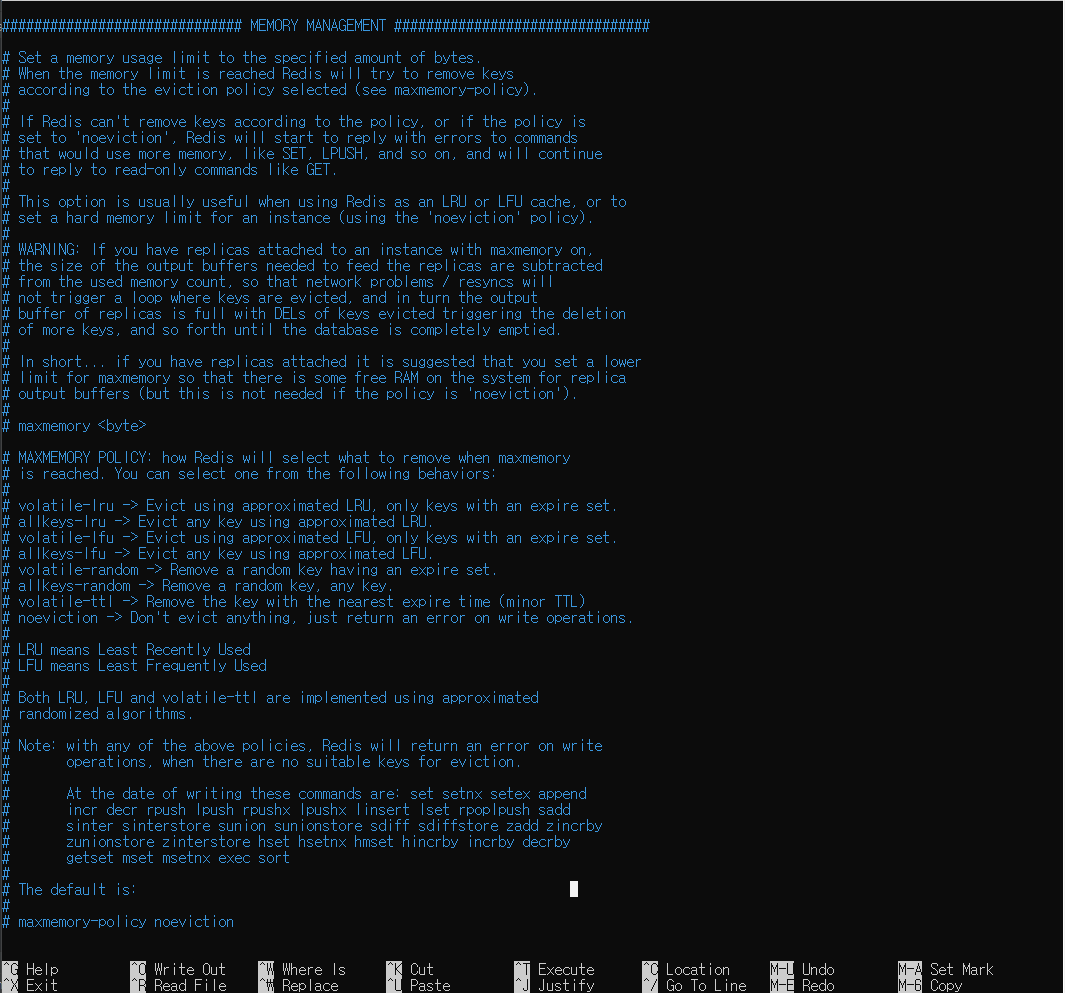
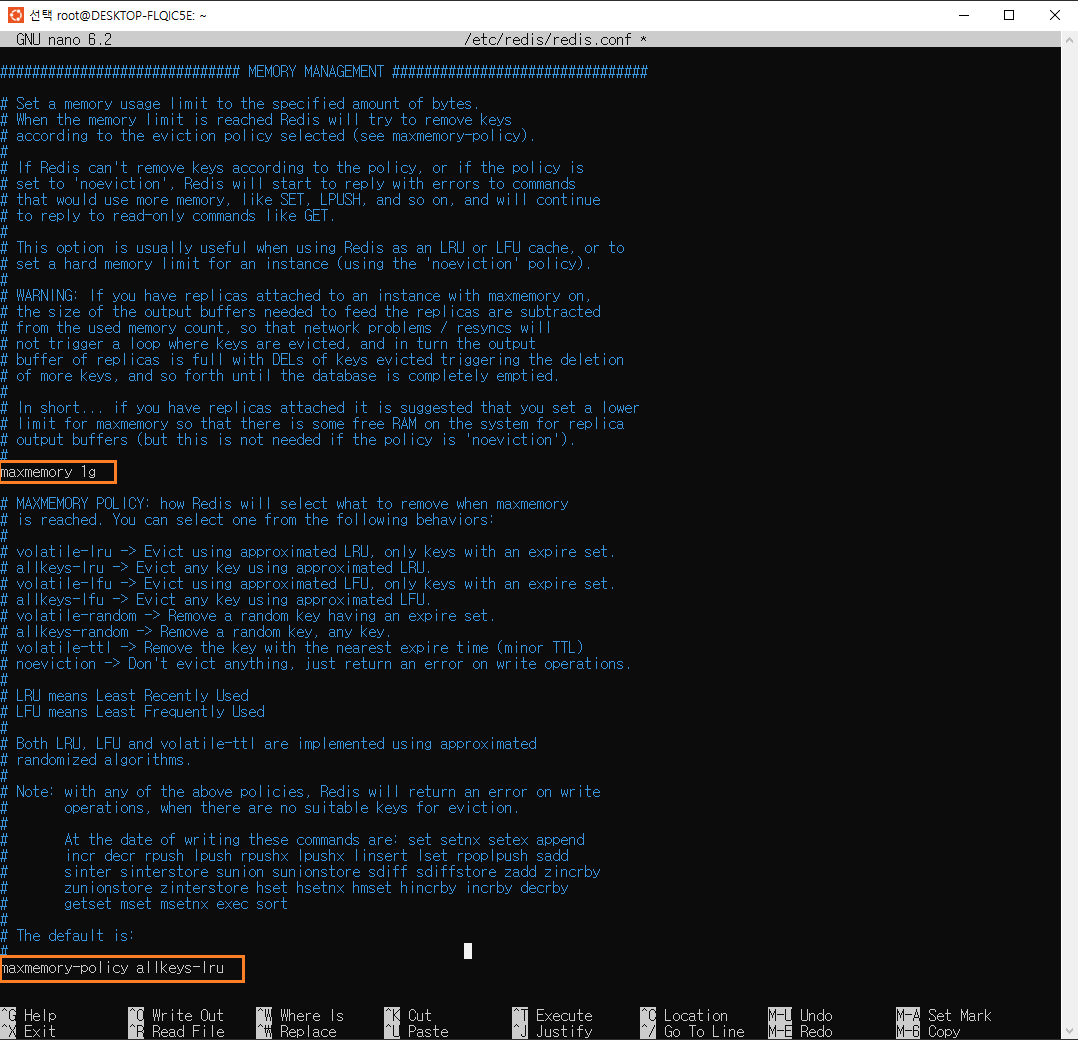
3. 메모리 설정
: 최대 사용 메모리량과 최대사용 메모리 초과할 시 가장 오래된 데이터를 지워서 메모리를 확보하는 전략 설정
maxmemory 1g
maxmemory-policy allkeys-lru
: 검색은 ctrl + w이며, 저장은 ctrl + x 후 y 후 엔터
1) 기존
2) 변경
4. 설정 반영을 위해 레디스 재시작
/* 시작 */
$ sudo service redis-server start

/* 재시작 */
$ sudo service redis-server restart

/* 종료 */
$ sudo service redis-server stop
5. 포트 상태 확인
: 만약 netstat tools가 없을 경우 실행이 안되므로, 없다면 netstat tools부터 설치하자
$ apt install net-tools: 있거나 설치가 완료되면 아래 코드 실행 (6379는 레디스 기본 포트번호이다. 변경 희망시 configuration에서 변경)
$ netstat -nlpt | grep 6379
6. 레디스 클라이언트에 접속해서 데이터 작업 및 조회가 가능하다.
$ redis-cli
Spring 프로젝트 설정
1. build.gradle 설정
dependencies {
	...
	implementation 'org.springframework.boot:spring-boot-starter-data-redis'
    ...
}
2. application.yml 설정
spring:
  ...
  redis:
    host: localhost  # 127.0.0.1 과 같다
    port: 6379
2. RedisConfig 설정 (config 경로는 아무데나 넣으세요)
import org.springframework.beans.factory.annotation.Value;
import org.springframework.context.annotation.Bean;
import org.springframework.context.annotation.Configuration;
import org.springframework.data.redis.connection.RedisConnectionFactory;
import org.springframework.data.redis.connection.lettuce.LettuceConnectionFactory;
import org.springframework.data.redis.core.RedisTemplate;
import org.springframework.data.redis.serializer.StringRedisSerializer;

@Configuration
public class RedisConfig {

    @Value("${spring.redis.host}")
    private String host;

    @Value("${spring.redis.port}")
    private int port;

    @Bean
    public RedisConnectionFactory redisConnectionFactory() {
        return new LettuceConnectionFactory(host, port);
    }

    @Bean
    public RedisTemplate<?, ?> redisTemplate() {
        RedisTemplate<?, ?> redisTemplate = new RedisTemplate<>();
        redisTemplate.setConnectionFactory(redisConnectionFactory());
        redisTemplate.setKeySerializer(new StringRedisSerializer());
        redisTemplate.setValueSerializer(new StringRedisSerializer());
        return redisTemplate;
    }
}
레퍼런스
'Java & Spring > Spring' 카테고리의 다른 글
| [Logging] p6spy 커스터 마이징 (0) | 2023.02.15 |
|---|---|
| [JPQL] JPQL | Native Query 작성하기 (0) | 2023.02.15 |
| [Redis] (3) Redis로 로그아웃 (Access 및 Refresh Token 관리) (0) | 2023.02.11 |
| [Redis] (2) Redis로 로그인 (Refresh Token 관리) (0) | 2023.02.11 |
| [Redis] (1) Docker를 이용한 Redis 연결하기 (0) | 2023.02.11 |