
![[엔지니어링] VM ware를 이용한 서버 가상화](https://img1.daumcdn.net/thumb/R750x0/?scode=mtistory2&fname=https%3A%2F%2Fblog.kakaocdn.net%2Fdna%2FEPY9d%2Fbtsa9H9NDAP%2FAAAAAAAAAAAAAAAAAAAAAG7bD7vcDRj0Az7_gWJhI-wcNnH22XabqYZthJK-infb%2Fimg.jpg%3Fcredential%3DyqXZFxpELC7KVnFOS48ylbz2pIh7yKj8%26expires%3D1785509999%26allow_ip%3D%26allow_referer%3D%26signature%3Dp6MeGCHEF%252FJGdYMolLHFse413DU%253D)
728x90
시작하기 앞서
목적 : 가상으로 Windows server를 띄워 솔루션을 이용한 서버 및 DB를 구축하기 위함
주의사항 : 본인의 VM Ware 버전, Windows server 버전, x86 or x64 등 프로세서 등에 맞춰서 진행해야함
서버 가상화(=가상 서버 띄우기)
1. VM Ware 설치 (VM Ware 공식 링크(유료), VM Ware Player 공식 링크(무료))
2. New virtual machine... 클릭
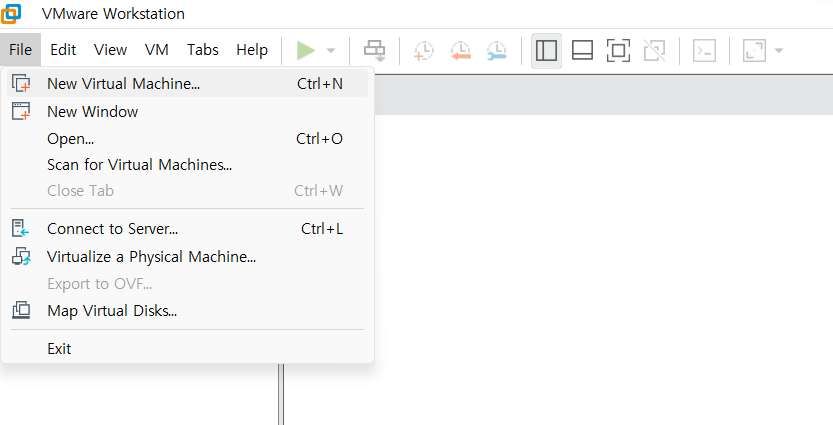
3. Next(Typical) ⇒ Installer disc image file(iso)의 Browse..
4. Windows server 2016의 iso 파일 선택 후 Next (Windows server.iso 파일 다운로드 링크)
5. 이후 Next 로 이어서 진행
6. Edit virtual machine settings (시스템 설정)은 다음과 같이 기본세팅
Memory : 2G / Processors : 1 core / CD/DVD : Auto detect / Network Adapter : Bridged(Auto)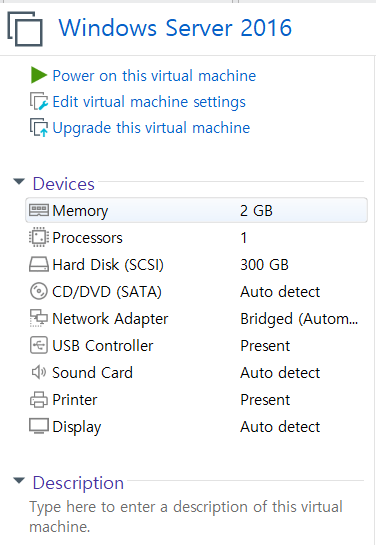
가상 서버 사양 세팅 (Windows server 2016 기준)
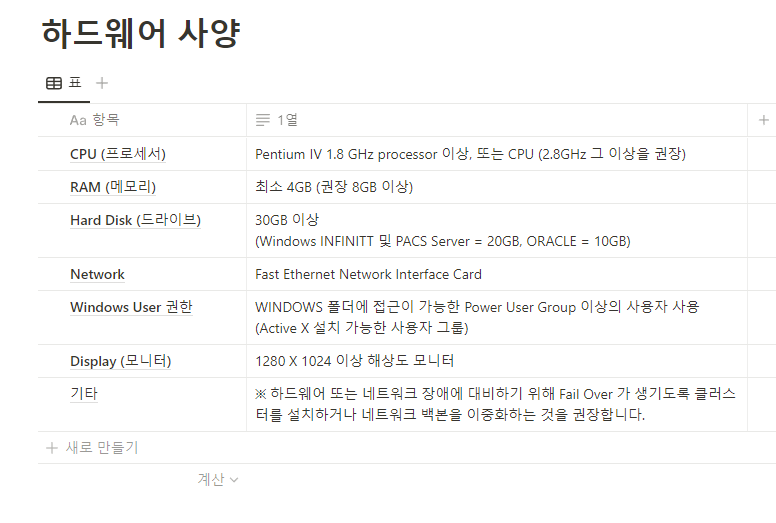
참고 링크
1. 이 PC 초기화 : https://sprout13.tistory.com/18
2. 이 PC 초기화 메뉴가 없을 경우 : https://clouduu.tistory.com/18
728x90
'CS > 서버 엔지니어링' 카테고리의 다른 글
| [엔지니어링] VM Manager 윈도우 가상화 (0) | 2023.04.05 |
|---|